The fix is upstream of the tool. You don’t need a different AI. You need a different prompt — one that names what you can’t change before it asks for any advice. After a year of using ChatGPT this way for my own apartment, I keep a saved master prompt at the top of every new chat, plus four follow-ups for specific decisions. The rest of this post is that library. The point isn’t that ChatGPT got smarter; it’s that the room I described stopped looking like someone else’s.
The renter prompt you paste before any AI room design conversation
This is the prompt that goes at the top of any new chat (ChatGPT, Claude, anything conversational). Fill the bracketed fields with your actual numbers. The constraints at the bottom are the part that does the heavy lifting; without them, the AI defaults back to homeowner mode within two replies.
I rent a [size, e.g. one-bedroom] apartment, [orientation, e.g. north-facing main window], [floor type, e.g. laminate]. My lease prohibits paint, anchored shelving, holes larger than a small nail, and any change to fixtures (lighting, faucets, cabinets, flooring). I am decorating, not renovating.

Existing furniture I cannot replace: [list 1–3 items].
Aesthetic I am working toward: [one name, e.g. warm minimalism, sage cottagecore, dark academia].
Total budget for the next 3 months: $[amount].

Constraints — read these before you answer:
1. Do not suggest painting anything.
2. Do not suggest built-in, mounted, or anchored shelving.
3. Do not suggest replacing fixtures.
4. Every suggestion must come off in under 15 minutes on move-out day.

What I want from this conversation: [diagnostic / shopping list / layout review / single decision].
What this prompt does, mechanically: it puts the renter constraint above the request, so the model treats it as a frame rather than a footnote. The numbered list is the part most renter prompts skip and the part that does the most work. Without those four lines, AI defaults to “paint an accent wall” on any apartment question. With them, the answer reroutes to reversible options for the rest of the conversation.
I built two AI kits for the moments this prompt can’t carry alone
I’ve been the renter typing variations of the master prompt above for the last few years. The pattern got familiar: open a new chat, write the limitations in by hand, ask, repeat. Some moments the prompt was enough. Others I kept wishing the renter brain was already inside the chat. That’s the gap the two AI Home Studio kits below were built to close.
1. Room Snapshot: the free diagnostic for when you can’t name what’s off
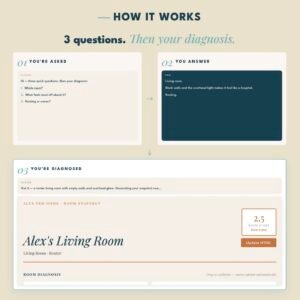
That same six-months-in moment, where the room you used to be excited about quietly stopped working without telling you why. Some afternoon last week you noticed the whole thing read flat. I hit this on my third apartment, kept running variants of the same diagnostic prompt in chat after chat, and finally saved it into a kit with the renter brain pre-installed: Room Snapshot. You paste a paragraph about the room. Four minutes later the kit returns an interactive dashboard with a four-category audit and a ranked list of moves that would shift the room most.
2. Interior Advisor & Action Kit: for the rooms that aren’t a one-prompt problem
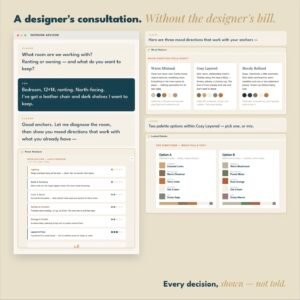
Then the other version of decorating trouble: the whole apartment is in flux. You’ve just moved in, or there’s a vibe across the whole place that no single prompt is going to repair in one chat. I hit this on a move two years ago. I was running the master prompt five times in five chats, then trying to stitch the answers together into a coherent plan. The stitching was the part that broke. So I built the Interior Advisor & Action Kit to be the stitching, pre-built. The kit walks you through Room Analysis, then Mood Options, then Palette Options, then a final action dashboard you keep: tabbed, editable, downloadable as an HTML file. $37,00 once, dashboard sticks around long after the chat closes.
Most days, the prompt above is what you actually need. Save it, reuse it, edit the brackets when your situation changes. The kits below are the saved version I built once I got tired of typing the setup every time. They’re extra help if you want it, not a swap-out. The free workflow still does the job.
Why conversation beats image generation for renters: the picture is the dopamine hit, the prompt is the work, and the work is where rentals actually change. The longer version sits in my earlier post on AI interior design for renters.
Save the master prompt somewhere you’ll find it. Paste it at the top of any new AI chat about your apartment. The output stops looking like someone else’s room the moment the prompt stops sounding like someone else’s lease.