
![[AI] Room Snapshot — Interactive Room Diagnostic](https://alexneohome.com/wp-content/uploads/2026/08/v2_Room-Snapshot_1-500x625.png "v2_Room Snapshot_1")
![[AI] Room Snapshot — Interactive Room Diagnostic](https://alexneohome.com/wp-content/uploads/2026/08/v2_Room-Snapshot_2-500x625.png "v2_Room Snapshot_2")
![[AI] Room Snapshot — Interactive Room Diagnostic](https://alexneohome.com/wp-content/uploads/2026/08/v2_Room-Snapshot_3-500x625.png "v2_Room Snapshot_3")
![[AI] Room Snapshot — Interactive Room Diagnostic](https://alexneohome.com/wp-content/uploads/2026/08/v2_Room-Snapshot_4-500x625.png "v2_Room Snapshot_4")
![[AI] Room Snapshot — Interactive Room Diagnostic](https://alexneohome.com/wp-content/uploads/2026/08/v2_Room-Snapshot_5-500x625.png "v2_Room Snapshot_5")
![[AI] Room Snapshot — Interactive Room Diagnostic](https://alexneohome.com/wp-content/uploads/2026/08/v2_Room-Snapshot_6-500x625.png "v2_Room Snapshot_6")
![[AI] Room Snapshot — Interactive Room Diagnostic](https://alexneohome.com/wp-content/uploads/2026/08/v2_Room-Snapshot_7-500x625.png "v2_Room Snapshot_7")
![[AI] Room Snapshot — Interactive Room Diagnostic](https://alexneohome.com/wp-content/uploads/2026/08/v2_Room-Snapshot_8-500x625.png "v2_Room Snapshot_8")
![[AI] Room Snapshot — Interactive Room Diagnostic](https://alexneohome.com/wp-content/uploads/2026/08/v2_Room-Snapshot_1-100x100.png "v2_Room Snapshot_1")
![[AI] Room Snapshot — Interactive Room Diagnostic](https://alexneohome.com/wp-content/uploads/2026/08/v2_Room-Snapshot_2-100x100.png "v2_Room Snapshot_2")
![[AI] Room Snapshot — Interactive Room Diagnostic](https://alexneohome.com/wp-content/uploads/2026/08/v2_Room-Snapshot_3-100x100.png "v2_Room Snapshot_3")
![[AI] Room Snapshot — Interactive Room Diagnostic](https://alexneohome.com/wp-content/uploads/2026/08/v2_Room-Snapshot_4-100x100.png "v2_Room Snapshot_4")
![[AI] Room Snapshot — Interactive Room Diagnostic](https://alexneohome.com/wp-content/uploads/2026/08/v2_Room-Snapshot_5-100x100.png "v2_Room Snapshot_5")
![[AI] Room Snapshot — Interactive Room Diagnostic](https://alexneohome.com/wp-content/uploads/2026/08/v2_Room-Snapshot_6-100x100.png "v2_Room Snapshot_6")
![[AI] Room Snapshot — Interactive Room Diagnostic](https://alexneohome.com/wp-content/uploads/2026/08/v2_Room-Snapshot_7-100x100.png "v2_Room Snapshot_7")
![[AI] Room Snapshot — Interactive Room Diagnostic](https://alexneohome.com/wp-content/uploads/2026/08/v2_Room-Snapshot_8-100x100.png "v2_Room Snapshot_8")
Something feels off about your room — but you can’t name it, and another hour on Pinterest isn’t going to help. Room Snapshot is a free AI-powered interior design diagnostic that scores what’s off in your room and hands you the ranked moves to fix it, delivered as a live interactive dashboard — not a static PDF.
What you get
- A 4-category audit of your room. Lighting, Layout, Walls, and Storage — each scored 1 to 5, with a diagnosis sentence written for your specific situation, not a generic template.
- Ranked moves, sorted by impact. The biggest-payoff fix is move #1, every time. Step-by-step walkthroughs and 2 real product picks per move (name, store, price).
- An interactive dashboard you control. Drag the sliders to recalibrate any score and watch the moves re-rank automatically. Check moves off as you complete them.
- Yours to keep, edit, and re-save. Download the dashboard as an HTML file, edit anything later — your scores, your notes, your room — and save a new version (v2, v3, and so on).
How it works
- Set up your free Claude Project. Open the kit, paste the system prompt, hit send.
- Answer 3 quick questions. Which room. What feels off. Renting or owning.
- Get your interactive dashboard. Scored audit, ranked moves, walkthroughs, products — generated for your room, not a template.
Why it’s different
This isn’t a chat that disappears. It isn’t a static PDF. It’s a new kind of design tool that didn’t exist a year ago.
You answer 3 questions. Claude generates an interactive dashboard for your room — scored across 4 categories, ranked by what’ll move the needle most, with real product picks at every step. Drag a slider, watch the priority list re-sort live. Mark moves done. Download the whole thing as an HTML file you keep forever.
It’s also built around how renters actually live. No drilling, no paint, no risk to the deposit. Every move and product pick respects those constraints by default.
The hidden bonus: this kit doubles as a hands-on intro to Claude, the AI tool that powers it. You diagnose your room and walk away with a tool you can keep using for everything after. One free download, two new things in your hands.
Who it’s for
Room Snapshot works for anyone trying to make sense of a room they’ve stopped seeing — first apartment setup, studio apartment decor, a bedroom that’s been bugging you for months, a living room you can’t quite finish. If the Snapshot points at a problem you want to solve end-to-end, three Starter kits pick up where this leaves off: the Room Refresh Planner (when you want a new feel without new furniture), the Renter Move-In Planner (when you’ve just signed a lease), and the Small Space Solver (when square footage is the real constraint).
FAQ
Do I need a Claude account? Yes — a free Claude account is enough. The kit walks you through setting one up in under 2 minutes. No paid plan required.
Is the email signup required to get the kit? Yes — the kit is delivered to your inbox after you submit your email. That’s the only “payment.”
Can I edit the dashboard after I download it? Yes. Open the saved HTML in any browser, change scores, update notes, check off moves you’ve completed, and hit “Update HTML” to save a fresh version.
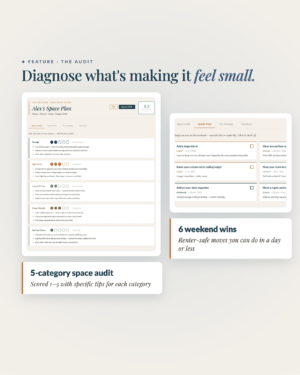
![[AI] Small Space Solver — Smart Plan for Small Apartments](https://alexneohome.com/wp-content/uploads/2026/08/v2_Small-Space-Solver_1-300x375.png "v2_Small Space Solver_1")
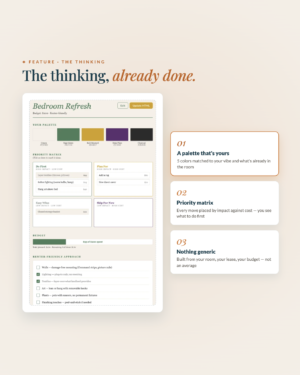
![[AI] Room Refresh Planner — Interactive Plan & Budget Tracker](https://alexneohome.com/wp-content/uploads/2026/08/v2_Room-Refresh-Planner_1-300x375.png "v2_Room Refresh Planner_1")
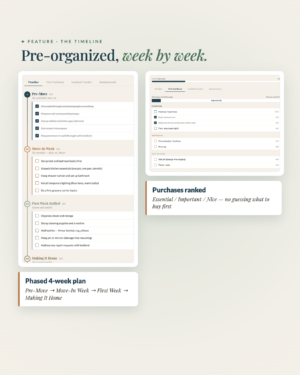
![[AI] Renter's Move-In Planner — Interactive Move-In Timeline](https://alexneohome.com/wp-content/uploads/2026/08/v2_Move-in-planner_1-300x375.png "v2_Move in planner_1")
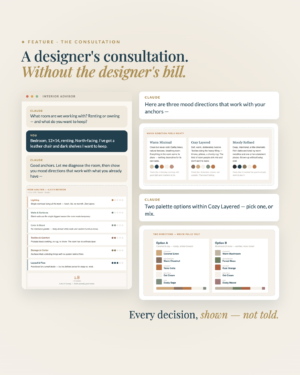
![[AI] The Interior Advisor & Action Kit — Designer Consultation](https://alexneohome.com/wp-content/uploads/2026/08/v2_Interior-advisor_1-300x375.png "v2_Interior advisor_1")
![[AI] Gallery Wall Studio — Visualized Layout Planner](https://alexneohome.com/wp-content/uploads/2026/08/v2_Gallery-Wall-Studio_1-300x377.png "v2_Gallery Wall Studio_1")
![[AI] The Room Reset — Smart 7-Day Style Plan](https://alexneohome.com/wp-content/uploads/2026/08/v2_Room-Reset_1-300x378.png "v2_Room Reset_1")
Reviews
There are no reviews yet.