
![[AI] Gallery Wall Studio — Visualized Layout Planner](https://alexneohome.com/wp-content/uploads/2026/08/v2_Gallery-Wall-Studio_1-500x629.png "v2_Gallery Wall Studio_1")
![[AI] Gallery Wall Studio — Visualized Layout Planner](https://alexneohome.com/wp-content/uploads/2026/08/v2_Gallery-Wall-Studio_2-500x629.png "v2_Gallery Wall Studio_2")
![[AI] Gallery Wall Studio — Visualized Layout Planner](https://alexneohome.com/wp-content/uploads/2026/08/v2_Gallery-Wall-Studio_3-500x629.png "v2_Gallery Wall Studio_3")
![[AI] Gallery Wall Studio — Visualized Layout Planner](https://alexneohome.com/wp-content/uploads/2026/08/v2_Gallery-Wall-Studio_4-500x629.png "v2_Gallery Wall Studio_4")
![[AI] Gallery Wall Studio — Visualized Layout Planner](https://alexneohome.com/wp-content/uploads/2026/08/v2_Gallery-Wall-Studio_5-500x629.png "v2_Gallery Wall Studio_5")
![[AI] Gallery Wall Studio — Visualized Layout Planner](https://alexneohome.com/wp-content/uploads/2026/08/v2_Gallery-Wall-Studio_6-500x629.png "v2_Gallery Wall Studio_6")
![[AI] Gallery Wall Studio — Visualized Layout Planner](https://alexneohome.com/wp-content/uploads/2026/08/v2_Gallery-Wall-Studio_7-500x629.png "v2_Gallery Wall Studio_7")
![[AI] Gallery Wall Studio — Visualized Layout Planner](https://alexneohome.com/wp-content/uploads/2026/08/v2_Gallery-Wall-Studio_8-500x629.png "v2_Gallery Wall Studio_8")
![[AI] Gallery Wall Studio — Visualized Layout Planner](https://alexneohome.com/wp-content/uploads/2026/08/v2_Gallery-Wall-Studio_9-500x629.png "v2_Gallery Wall Studio_9")
![[AI] Gallery Wall Studio — Visualized Layout Planner](https://alexneohome.com/wp-content/uploads/2026/08/v2_Gallery-Wall-Studio_1-100x100.png "v2_Gallery Wall Studio_1")
![[AI] Gallery Wall Studio — Visualized Layout Planner](https://alexneohome.com/wp-content/uploads/2026/08/v2_Gallery-Wall-Studio_2-100x100.png "v2_Gallery Wall Studio_2")
![[AI] Gallery Wall Studio — Visualized Layout Planner](https://alexneohome.com/wp-content/uploads/2026/08/v2_Gallery-Wall-Studio_3-100x100.png "v2_Gallery Wall Studio_3")
![[AI] Gallery Wall Studio — Visualized Layout Planner](https://alexneohome.com/wp-content/uploads/2026/08/v2_Gallery-Wall-Studio_4-100x100.png "v2_Gallery Wall Studio_4")
![[AI] Gallery Wall Studio — Visualized Layout Planner](https://alexneohome.com/wp-content/uploads/2026/08/v2_Gallery-Wall-Studio_5-100x100.png "v2_Gallery Wall Studio_5")
![[AI] Gallery Wall Studio — Visualized Layout Planner](https://alexneohome.com/wp-content/uploads/2026/08/v2_Gallery-Wall-Studio_6-100x100.png "v2_Gallery Wall Studio_6")
![[AI] Gallery Wall Studio — Visualized Layout Planner](https://alexneohome.com/wp-content/uploads/2026/08/v2_Gallery-Wall-Studio_7-100x100.png "v2_Gallery Wall Studio_7")
![[AI] Gallery Wall Studio — Visualized Layout Planner](https://alexneohome.com/wp-content/uploads/2026/08/v2_Gallery-Wall-Studio_8-100x100.png "v2_Gallery Wall Studio_8")
![[AI] Gallery Wall Studio — Visualized Layout Planner](https://alexneohome.com/wp-content/uploads/2026/08/v2_Gallery-Wall-Studio_9-100x100.png "v2_Gallery Wall Studio_9")
Most gallery walls fail because people skip the planning step. Gallery Wall Studio is an AI-powered planner that takes your exact wall dimensions, your style preference, and what’s going on the wall — then draws three layout options scaled to your space, with the frame sizes, hanging coordinates, and shopping list already worked out.
What you get
- Three layouts drawn to your exact wall. Clean Grid, Salon Cluster, Symmetrical, Horizontal Line, or Staircase — pick your favorite, swap to compare. Every frame is sized for your wall, not a Pinterest one.
- Hanging coordinates for every frame. Distance from ceiling, distance from left edge, exact strip count — so the wall in your head matches the wall on your wall.
- A complete shopping list. Frame sizes with rough costs, mounting supplies (Command strips for renters, picture hooks for owners), and the basic tools you’ll need.
- Switch layouts, hide frames, edit live. Don’t like a piece in the salon arrangement? Hide it. Want to compare the grid against the staircase? One click. Your final dashboard is downloadable as HTML.
How it works
- Set up your free Claude Project. Open the kit, paste the system prompt, hit send.
- Answer a few quick questions. Wall dimensions, room, style preference, what’s going up there, color mood.
- Get your interactive layout planner. Three layouts drawn for your wall, with hanging instructions and a shopping list ready to go.
Why it’s different
Most gallery wall content is mood — beautiful pins with no measurements. ChatGPT will give you a paragraph about “balance and proportion.” Neither of those help when you’re standing in front of a real wall holding a hammer.
Gallery Wall Studio does the planning, the measuring, and the math. You just hang. And because it’s built around how renters live, the default mounting plan is Command strips and removable hooks — fully damage-free. Switch to owner mode if you’d rather drill.
The hidden bonus: this kit doubles as a hands-on intro to Claude, the AI tool that powers it. You design your gallery wall and walk away with a tool you can keep using for everything after. One paid kit, two new things in your hands.
Who it’s for
Use this when you’re staring at a blank wall, a finished collection of art, or a stack of frames that haven’t found their place. Works for any wall: above the sofa, above the bed, stairwell, hallway, dining wall. Renter-safe by default, owner-mode optional.
Want printable paper templates for the actual hanging step? The original Gallery Wall Layout Kit (PDF) ships printable arrangement templates that complement this digital planner. Just trying to figure out if a gallery wall is the right move first? Start with the free Room Snapshot for a one-room diagnostic.
FAQ
Do I need a Claude account? Claude Pro is recommended — the layout canvas renders best on Pro. The free tier works for most outputs but may hit rendering limits on the visual canvas view.
What if I already have art picked out? Even better. Tell Claude what you have (sizes, types — photos, prints, mirrors), and the layouts will plan around your existing pieces instead of generic placeholders.
How is this different from the Gallery Wall Layout Kit (PDF)? The PDF kit gives you a planning guide and printable paper templates to trace on your wall before hanging — a physical hanging aid. Gallery Wall Studio is the digital planner that decides the layout, sizes, and hanging coordinates for your specific wall. They’re complementary: planner first, paper templates last.
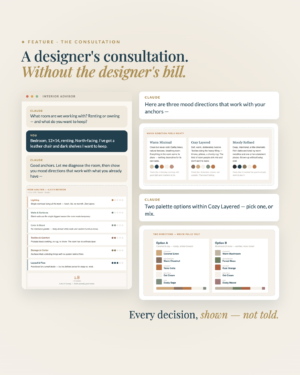
![[AI] The Interior Advisor & Action Kit — Designer Consultation](https://alexneohome.com/wp-content/uploads/2026/08/v2_Interior-advisor_1-300x375.png "v2_Interior advisor_1")
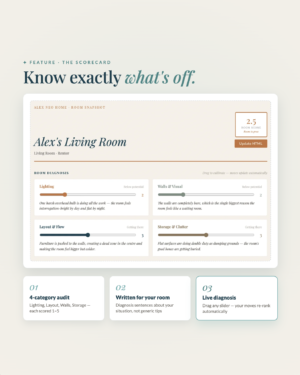
![[AI] Room Snapshot — Interactive Room Diagnostic](https://alexneohome.com/wp-content/uploads/2026/08/v2_Room-Snapshot_1-300x375.png "v2_Room Snapshot_1")
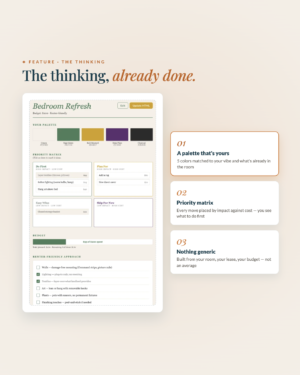
![[AI] Room Refresh Planner — Interactive Plan & Budget Tracker](https://alexneohome.com/wp-content/uploads/2026/08/v2_Room-Refresh-Planner_1-300x375.png "v2_Room Refresh Planner_1")
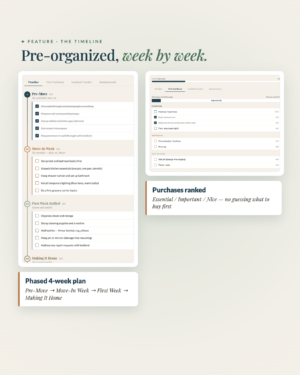
![[AI] Renter's Move-In Planner — Interactive Move-In Timeline](https://alexneohome.com/wp-content/uploads/2026/08/v2_Move-in-planner_1-300x375.png "v2_Move in planner_1")

![[AI] Small Space Solver — Smart Plan for Small Apartments](https://alexneohome.com/wp-content/uploads/2026/08/v2_Small-Space-Solver_1-300x375.png "v2_Small Space Solver_1")
![[AI] The Room Reset — Smart 7-Day Style Plan](https://alexneohome.com/wp-content/uploads/2026/08/v2_Room-Reset_1-300x378.png "v2_Room Reset_1")
Reviews
There are no reviews yet.