
![[AI] Room Refresh Planner — Interactive Plan & Budget Tracker](https://alexneohome.com/wp-content/uploads/2026/08/v2_Room-Refresh-Planner_1-500x625.png "v2_Room Refresh Planner_1")
![[AI] Room Refresh Planner — Interactive Plan & Budget Tracker](https://alexneohome.com/wp-content/uploads/2026/08/v2_Room-Refresh-Planner_2-500x625.png "v2_Room Refresh Planner_2")
![[AI] Room Refresh Planner — Interactive Plan & Budget Tracker](https://alexneohome.com/wp-content/uploads/2026/08/v2_Room-Refresh-Planner_3-500x625.png "v2_Room Refresh Planner_3")
![[AI] Room Refresh Planner — Interactive Plan & Budget Tracker](https://alexneohome.com/wp-content/uploads/2026/08/v2_Room-Refresh-Planner_4-500x625.png "v2_Room Refresh Planner_4")
![[AI] Room Refresh Planner — Interactive Plan & Budget Tracker](https://alexneohome.com/wp-content/uploads/2026/08/v2_Room-Refresh-Planner_5-500x625.png "v2_Room Refresh Planner_5")
![[AI] Room Refresh Planner — Interactive Plan & Budget Tracker](https://alexneohome.com/wp-content/uploads/2026/08/v2_Room-Refresh-Planner_6-500x625.png "v2_Room Refresh Planner_6")
![[AI] Room Refresh Planner — Interactive Plan & Budget Tracker](https://alexneohome.com/wp-content/uploads/2026/08/v2_Room-Refresh-Planner_7-500x625.png "v2_Room Refresh Planner_7")
![[AI] Room Refresh Planner — Interactive Plan & Budget Tracker](https://alexneohome.com/wp-content/uploads/2026/08/v2_Room-Refresh-Planner_8-500x625.png "v2_Room Refresh Planner_8")
![[AI] Room Refresh Planner — Interactive Plan & Budget Tracker](https://alexneohome.com/wp-content/uploads/2026/08/v2_Room-Refresh-Planner_9-500x625.png "v2_Room Refresh Planner_9")
![[AI] Room Refresh Planner — Interactive Plan & Budget Tracker](https://alexneohome.com/wp-content/uploads/2026/08/v2_Room-Refresh-Planner_1-100x100.png "v2_Room Refresh Planner_1")
![[AI] Room Refresh Planner — Interactive Plan & Budget Tracker](https://alexneohome.com/wp-content/uploads/2026/08/v2_Room-Refresh-Planner_2-100x100.png "v2_Room Refresh Planner_2")
![[AI] Room Refresh Planner — Interactive Plan & Budget Tracker](https://alexneohome.com/wp-content/uploads/2026/08/v2_Room-Refresh-Planner_3-100x100.png "v2_Room Refresh Planner_3")
![[AI] Room Refresh Planner — Interactive Plan & Budget Tracker](https://alexneohome.com/wp-content/uploads/2026/08/v2_Room-Refresh-Planner_4-100x100.png "v2_Room Refresh Planner_4")
![[AI] Room Refresh Planner — Interactive Plan & Budget Tracker](https://alexneohome.com/wp-content/uploads/2026/08/v2_Room-Refresh-Planner_5-100x100.png "v2_Room Refresh Planner_5")
![[AI] Room Refresh Planner — Interactive Plan & Budget Tracker](https://alexneohome.com/wp-content/uploads/2026/08/v2_Room-Refresh-Planner_6-100x100.png "v2_Room Refresh Planner_6")
![[AI] Room Refresh Planner — Interactive Plan & Budget Tracker](https://alexneohome.com/wp-content/uploads/2026/08/v2_Room-Refresh-Planner_7-100x100.png "v2_Room Refresh Planner_7")
![[AI] Room Refresh Planner — Interactive Plan & Budget Tracker](https://alexneohome.com/wp-content/uploads/2026/08/v2_Room-Refresh-Planner_8-100x100.png "v2_Room Refresh Planner_8")
![[AI] Room Refresh Planner — Interactive Plan & Budget Tracker](https://alexneohome.com/wp-content/uploads/2026/08/v2_Room-Refresh-Planner_9-100x100.png "v2_Room Refresh Planner_9")
You don’t need to start over — you need a plan. Room Refresh Planner is an AI-powered tool that takes your budget, your vibe, and what’s bugging you about the room, and gives you back a ranked action plan: a palette, a priority matrix, and a live budget tracker — all on an interactive dashboard you control.
What you get
- A 5-color palette tuned to your vibe. Tell it cozy, minimal, bold, warm, or moody — it matches the colors and shows you the exact hex.
- A priority matrix sorted by impact and cost. “Do First,” “Plan For,” “Easy Wins,” “Skip For Now” — every item placed where it actually belongs, not where it’s easiest to buy.
- A live budget tracker. Mark items done as you go and watch your remaining budget update in real time.
- A renter or owner checklist. Tells you exactly what’s safe at your level of commitment — Command strips and removable hooks if you rent, drilling and dimmers if you own.
How it works
- Set up your free Claude Project. Open the kit, paste the system prompt, hit send.
- Answer 5 quick questions. Room, budget, renting or owning, vibe, what’s bugging you most.
- Get your interactive refresh plan. Palette, priority matrix, budget tracker, checklist — generated for your room, your budget, your taste. Not a template.
Why it’s different
Most AI tools give you a wall of text. Pinterest gives you mood without a path. Room Refresh Planner gives you something neither does — a structured plan that says exactly what to do first, second, and skip, with the budget math already built in.
It’s also built around how renters live. Every “Do First” item works without drilling, paint, or risk to the deposit. Switch to owner mode and the checklist updates to give you the bigger moves you’ve been holding off on.
The hidden bonus: this kit doubles as a hands-on intro to Claude, the AI tool that powers it. You refresh your room and walk away with a tool you can keep using for everything after. One paid kit, two new things in your hands.
Who it’s for
Use this when you don’t want a renovation — you want the room you already have to feel intentional. Works for any room: bedroom, living room, kitchen, bathroom, entryway, home office.
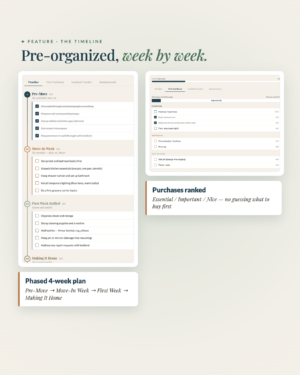
Just trying to figure out what’s wrong first? Start with the free Room Snapshot — it’ll diagnose your room in 5 minutes. Need something tighter? Small Space Solver is the right pick if square footage is the real constraint. Just signed a lease? Renter Move-In Planner is built for that exact moment.
FAQ
Do I need a Claude account? Yes — a free Claude account works. The kit walks you through setting one up. Claude Pro is recommended for best rendering of the dashboard but isn’t required.
How long does the planning take? About 10 minutes from paste to dashboard. Then it’s yours to edit, save, and act on at whatever pace you want.
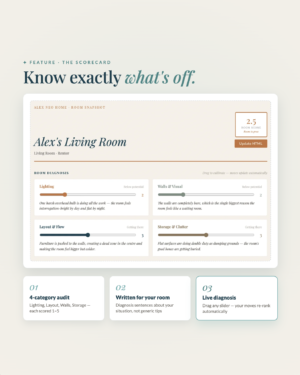
How is this different from the free Room Snapshot? The Snapshot diagnoses what’s off in 4 categories with quick fixes. The Refresh Planner takes a full pass at the room — palette, priority matrix, budget, checklist — and is built to be your reference while you actually shop and execute. Snapshot is the diagnosis. Refresh is the plan.
![[AI] The Room Reset — Smart 7-Day Style Plan](https://alexneohome.com/wp-content/uploads/2026/08/v2_Room-Reset_1-300x378.png "v2_Room Reset_1")
![[AI] Room Snapshot — Interactive Room Diagnostic](https://alexneohome.com/wp-content/uploads/2026/08/v2_Room-Snapshot_1-300x375.png "v2_Room Snapshot_1")
![[AI] The Interior Advisor & Action Kit — Designer Consultation](https://alexneohome.com/wp-content/uploads/2026/08/v2_Interior-advisor_1-300x375.png "v2_Interior advisor_1")
![[AI] Renter's Move-In Planner — Interactive Move-In Timeline](https://alexneohome.com/wp-content/uploads/2026/08/v2_Move-in-planner_1-300x375.png "v2_Move in planner_1")
![[AI] Small Space Solver — Smart Plan for Small Apartments](https://alexneohome.com/wp-content/uploads/2026/08/v2_Small-Space-Solver_1-300x375.png "v2_Small Space Solver_1")
![[AI] Gallery Wall Studio — Visualized Layout Planner](https://alexneohome.com/wp-content/uploads/2026/08/v2_Gallery-Wall-Studio_1-300x377.png "v2_Gallery Wall Studio_1")
Reviews
There are no reviews yet.